Check SEPCO Bill Online by Entering 14 Digit Reference No
You are a SEPCO consumer and want to check your SEPCO Online Bill. It is very simple: Enter your 14-Digit Reference Number or 10-Digit Customer ID to get your latest duplicate bill.
SEPCO Online Bill
Enter your 14-digit Reference Number to check your latest SEPCO bill.
How to Check SEPCO Bill Online
You can check your SEPCO electricity bill online in a few simple steps. The bill can be accessed through the PITC online billing portal using your reference number.
- Find Your Reference Number: Take your previous SEPCO bill and locate the 14-digit Reference Number.
- Open the Bill Portal: Visit the official SEPCO/PITC online bill portal.
- Enter Reference Number: Enter your 14-digit Reference Number carefully without spaces or dashes.
- Submit the Details: Click the Check Bill or submit button.
- View Your Bill: Your latest SEPCO bill will appear on the screen.
- Download or Print: You can download or print the duplicate bill for your records or payment.
What is Reference Number and How to Find it
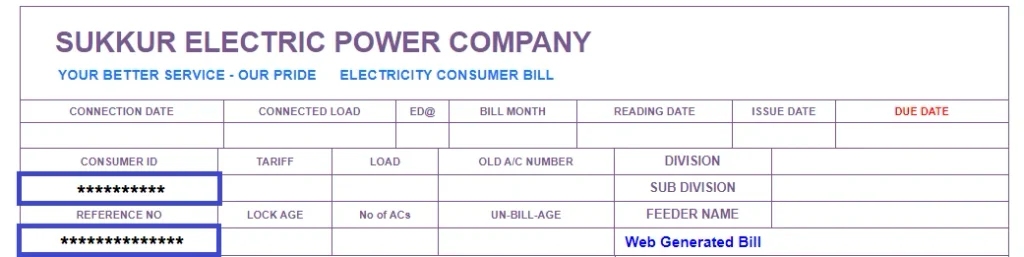
A Reference Number is a unique number that you can use to search and check your electricity bill online.
The Reference Number is a unique 14-digit number used to check your SEPCO electricity bill online. You can find it on the top-left corner of your previous bill. The Consumer ID is usually mentioned just below the Reference Number.
About SEPCO
Sukkur Electric Power Company (SEPCO) is responsible for supplying electricity to several areas of Sindh, Pakistan. It manages electricity distribution, billing, new connections, and other consumer services. SEPCO customers can also check their electricity bills online using their Reference Number or Consumer ID.
Sukkur Electric Power Company (SEPCO) is a public-sector electricity distribution company serving several areas of Sindh. It was formed in 2010 after the bifurcation of HESCO and was officially incorporated on 23 November 2010.
- Full Name: Sukkur Electric Power Company (SEPCO)
- Established: 2010
- Headquarters: Sukkur, Sindh, Pakistan
- Distribution License: Issued by NEPRA in 2011
- Main Operations: Sukkur, Larkana, Dadu and surrounding areas
SEPCO Areas Coverd
SEPCO provides electricity distribution services across several districts of Sindh, mainly in the northern and upper parts of the province. Its service area includes Sukkur, Ghotki, Khairpur, Kashmore/Kandhkot, Jacobabad, Shikarpur, Larkana, Kambar/Shahdadkot, and Dadu. It also covers some portions of Jamshoro, Naushehro Feroze, Shaheed Benazirabad, and Rahim Yar Khan.
Major areas include:
- Sukkur
- Ghotki
- Khairpur
- Kashmore/Kandhkot
- Jacobabad
- Shikarpur
- Larkana
- Kambar/Shahdadkot
- Dadu
- Parts of Jamshoro
- Parts of Naushehro Feroze
- Parts of Shaheed Benazirabad
- Some areas of Rahim Yar Khan
SEPCO Peak Hours
SEPCO follows the standard seasonal peak-hour schedule for Time-of-Use (TOU) consumers. According to NEPRA’s tariff documents, the timings are:
| Season | Peak Hours |
|---|---|
| December – February | 5:00 PM – 9:00 PM |
| March – May | 6:00 PM – 10:00 PM |
| June – August | 7:00 PM – 11:00 PM |
| September – November | 6:00 PM – 10:00 PM |
All other hours are considered off-peak. These timings mainly matter for consumers with TOU meters; regular residential consumers may not have separate peak/off-peak billing.
How to Pay SEPCO Online Bill
1. JazzCash
- Open the JazzCash App.
- Select Bill Payment → Electricity.
- Choose SEPCO and enter your reference number.
- Check the bill amount and confirm payment.
2. Easypaisa
- Open the Easypaisa App.
- Go to Bill Payments → Electricity.
- Select SEPCO and enter your reference number.
- Confirm the payment.
3. Banking App
- Open your banking app.
- Select Bill Payment → Electricity.
- Choose SEPCO and enter the required details.
- Review and confirm the payment.
4. ATM
- Insert your ATM card and enter your PIN.
- Select Bill Payment → Electricity → SEPCO.
- Enter your reference number and confirm the payment.
5. Bank Branch
- Take your SEPCO bill to a supported bank.
- Give the bill and payment amount to the cashier.
- Collect your paid receipt.
SEPCO Bill FAQs
1. How can I check my SEPCO bill online?
You can check your SEPCO bill online by entering your 14-digit Reference Number on the SEPCO/PITC bill portal.
2. Where can I find my SEPCO Reference Number?
Your 14-digit Reference Number is printed on the top-left section of your previous SEPCO electricity bill.
3. Can I check my SEPCO bill without a Reference Number?
Usually, you need your Reference Number or Customer ID to access your online bill. You cannot normally search the bill by name alone.
4. How can I get my SEPCO duplicate bill?
Enter your Reference Number on the online bill portal. Once your bill appears, you can view, download, or print a duplicate copy.
5. Is SEPCO online bill checking free?
Yes, checking and downloading your SEPCO duplicate bill online is generally free of charge.
6. Can I check my SEPCO bill by CNIC?
No, the online bill portal does not normally provide a CNIC-based bill search. You need your Reference Number or Customer ID.
7. How can I pay my SEPCO bill online?
You can pay your SEPCO bill through JazzCash, Easypaisa, mobile banking apps, internet banking, or supported ATMs.
8. What should I do if my SEPCO bill is not showing?
First, check that you entered the 14-digit Reference Number correctly. If the number is correct but the bill still does not appear, the latest bill may not have been generated yet or the portal may temporarily be unavailable.
9. Can I download my SEPCO bill as a PDF?
Yes. After opening your bill online, you can use the print or download option to save a PDF copy.
10. What is the SEPCO Customer ID?
The Customer ID is another identification number printed on your electricity bill. It is different from the 14-digit Reference Number and may be accepted by supported bill-payment services.
11. How can I check my SEPCO bill due date?
Open your latest online SEPCO bill. The due date and payable amount are shown on the bill.
12. Can I check my SEPCO bill from my mobile phone?
Yes. You can check your SEPCO bill from a mobile phone, tablet, or computer using an internet browser.
13. What happens if I pay my SEPCO bill after the due date?
A late-payment surcharge may be added, and you may have to pay the higher amount shown after the due date.
14. Does the SEPCO Reference Number change every month?
Normally, the Reference Number remains the same for the connection, so you can use it to check future bills.
15. How can I contact SEPCO for a billing complaint?
For billing issues such as incorrect readings, extra units, or other problems, you can contact SEPCO customer support or your local customer service center.