Check FESCO Bill Online by Entering 14 Digit Ref No
For areas served by FESCO, the FESCO Bill Online 2026 service makes it easy to check your electricity bill from home. Simply enter your 14-digit reference number or 10-digit consumer ID to view your bill, download a duplicate copy, and check payment details without visiting a FESCO office or bank. It is a quick and convenient option for all consumers.
How to Check FESCO Bill by Reference
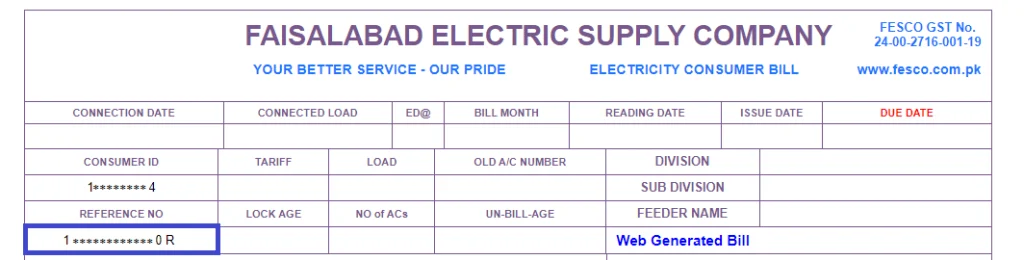
How to Check FESCO Bill by Reference Number
Checking your FESCO bill online by reference number is quick and easy. You only need your 14-digit reference number from a previous bill.
Steps to Check FESCO Bill
- Open the FESCO bill online checking page.
- Enter your 14-digit reference number in the required field.
- Click the Check Bill or Search button.
- Your latest FESCO e bill details will appear on the screen.
- You can view, download, or print the duplicate bill for your records.
How to Download FESCO Duplicate Bill
How to Download FESCO Duplicate Bill
If you have misplaced or lost your original bill, you can easily get a duplicate bill online. Just enter your bill details and follow these simple steps:
- Open the FESCO online bill checking page.
- Enter your 14-digit reference number or 10-digit consumer ID.
- Click on Check Bill to view your latest bill.
- Select the Download or Print option.
- Save the duplicate bill as a PDF or print a copy for payment.
FESCO New Connection & Bill Information
FESCO New Connection & Bill Information
If you are applying for a new electricity connection with FESCO, you may need to provide the required documents and complete the application process before the connection is approved. Once the connection is active, consumers receive a reference number or consumer ID, which can be used to check their electricity bill online.
Important FESCO Connection & Bill Information
- New Connection: Apply for a new electricity connection through the proper FESCO procedure.
- Required Documents: Keep your CNIC, proof of ownership or tenancy, and other required documents ready.
- Reference Number: Your 14-digit reference number can be used to check your bill online.
- Consumer ID: You can also check your bill using the 10-digit consumer ID, where supported.
- Bill Details: Online bill services can show the payable amount, due date, billing month, and electricity units.
- Duplicate Bill: If you lose your paper bill, you can view and download a duplicate copy online.
- Payment: After checking the bill, you can pay it through available banks, apps, or other supported payment channels.